Understand the parts
before opening SOLIDWORKS.
The exercise asks you to create four component designs and assemble ten instances into a guided press tool. This page explains what each 2D part represents, which dimensions matter and what to model first.
What are you building?
One Bottom Plate supports four Guide Pillars. One Top Plate carries four Guide Bushes and a central boss. The bushes slide along the pillars so the Top Plate can move up and down while staying aligned.
Model each unique part once. Reuse the pillar four times and the bush four times in the assembly.
Read the 2D information
Ø means diameter. Ø25 describes a full circle 25 mm across, not a radius of 25 mm.
Plan view means looking down. It locates the holes. A side view gives plate thickness, pillar length or boss projection.
Hidden lines show concealed geometry. For example, the boss underneath the Top Plate can be hidden in a plan view.
Repeated features share dimensions. “4 × Ø25” means four holes of the same diameter.
Bottom Plate
250 × 150 × 30 mm
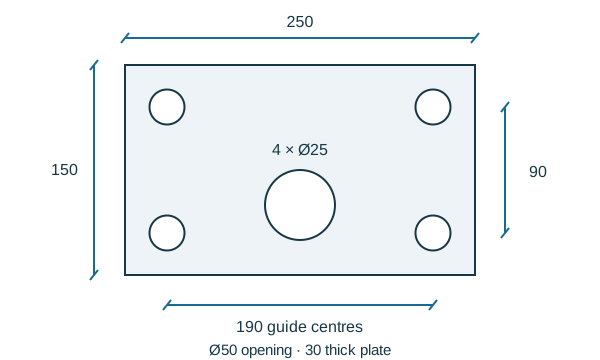
Four Ø25 through-holes locate the pillars. Their centres form a 190 × 90 mm rectangle, with 30 mm edge offsets. The Ø50 central opening is 125 mm from a short edge and 50 mm from the corresponding lower long edge.
Modeling order
Sketch the rectangle → extrude 30 mm → cut four guide holes → cut the central opening.
Top Plate
250 × 150 × 30 mm + Ø50 × 90 mm boss
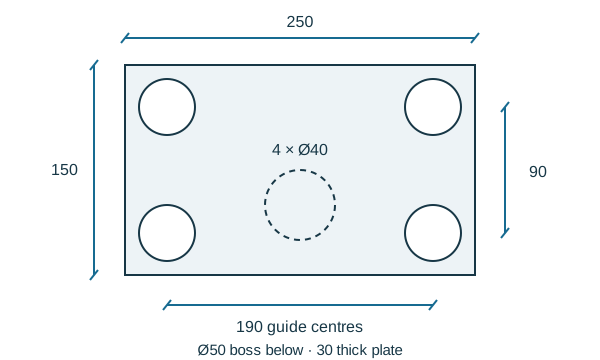
Use the same guide-centre pattern, but make the four holes Ø40 to receive the bushes. Add the Ø50 boss below the plate, aligned with the Bottom Plate’s central opening. Its 90 mm length projects from the underside.
Modeling order
Extrude the plate → cut four bush holes → extrude the boss downward.
Guide Pillar
Ø25 × 200 mm
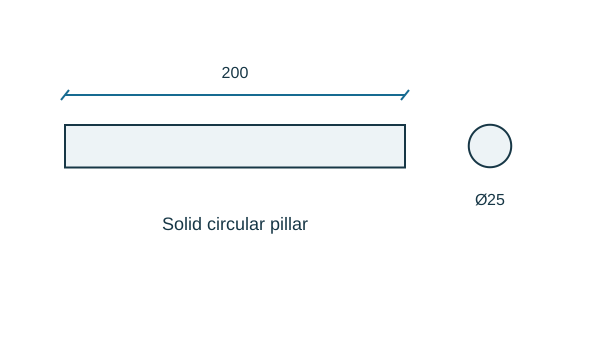
A solid cylinder defines a guide axis. Make one part and reuse it four times. Its diameter matches the nominal bush bore; production clearances are a separate design decision.
Modeling order
Sketch one Ø25 circle at the origin → extrude 200 mm.
Guide Bush
Ø40 outside × Ø25 bore × 60 mm long
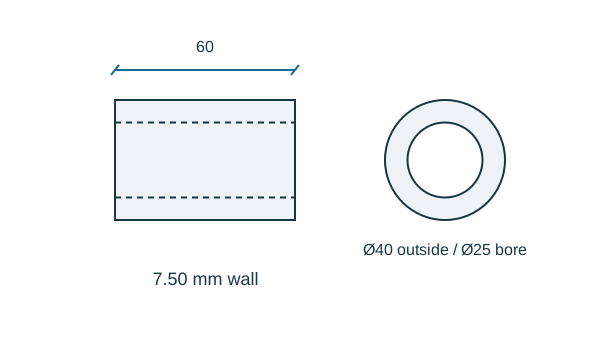
A hollow cylindrical guide sits in the Top Plate. The 40 mm outside diameter matches the plate hole, while the 25 mm bore surrounds the pillar. The nominal wall thickness is 7.50 mm.
Modeling order
Sketch concentric Ø40 and Ø25 circles → extrude the ring 60 mm.
Prepare your files and units
1 / Set up the project and understand the datums
- Create a folder named Press Tool Assembly. Keep all four parts and the assembly together.
- Select File → New → Part. Set the unit system in the status bar to MMGS. Under document unit settings, use two decimal places for length display.
- In the feature tree, select Top Plane → Sketch. Look normal to the sketch plane so the rectangle is square to your view.
- Use a centre rectangle with its centre coincident to the origin. Dimension the long horizontal side to 250 mm and the short side to 150 mm.
Why the origin matters: both plates share the same centre and guide pattern. A dimension change can then preserve symmetry without manually repositioning each feature.
Checkpoint: the sketch reports Fully Defined. Geometry commonly appears black when fully defined and blue when under-defined, depending on your colour settings. If it still moves, check the origin relation and missing dimensions before adding more constraints.
Your project checklist
- Four part designs: Bottom Plate, Top Plate, Guide Pillar and Guide Bush.
- One assembly using 1 + 1 + 4 + 4 component instances.
- Aligned guide axes and a correctly oriented central boss.
- MMGS units and two decimal places for displayed length dimensions.
The motion demonstration, hand calculations and drawing-development guidance are portfolio extensions to the modeling exercise.